The Sweet
Spot
ISSUE 01
NOVEMBER 2026
PILOT ISSUE
NOVEMBER 2026
PILOT ISSUE
ANALOG TONE FOR MODERN RECORDSSWEETSPOT-TOOLS.COM
FREE
COVER STORY · FT-02
Pillow Talk
An echo that waits for you: quiet while you sing, blooming in the pauses.
FT-04 · Vocal chain
A finished vocal: pick the mode, turn a few knobs.
Where we are heading, and why analog.
04EDITORIAL
05A console channel, without the console.
07An echo that waits for you: quiet while you sing, blooming in the pauses.
09Phone, radio, megaphone: one knob from clean to broken.
11A finished vocal: pick the mode, turn a few knobs.
13The last touch on your mix, with ranges that already make sense.
15What we are recording, and how far along.
16Install, DAWs, macOS, back issues.
17Who made this issue possible.
Most of the records we love were made on machines that weren’t perfect. Tape that squashed a little, tubes that warmed up, speakers that broke up in just the right way. That character is what we chase.
Sweetspot Tools builds plugins that give you that tone without a room full of gear. Each one models a real kind of analog behaviour and hides everything you don’t need: a few knobs, a panel that looks like the box it came from, and a sound you can trust.
The engine is modern: neural captures of real hardware, careful DSP, builds for Windows, macOS and Linux. The idea is old: turn a knob, hear it get better.
Where we’re heading: a small, honest family of tools that covers a whole song, from the vocal on the way in to the last touch on the master. All free, all open source.
This is the first issue of The Sweet Spot, a magazine about free plugins that chase analog character: tape that squashes a little, tubes that warm up, speakers that break up in just the right way.
An issue comes out when there is something worth telling: what shipped, what is still in the studio, and how far along each plugin is. Old issues stay exactly as they were.
For now the tapes are still in the studio. They will come out one at a time, and Pillow Talk goes first, expected around December. Until then, you can read about every plugin and follow the progress bars from one issue to the next.
We would like to hear from you. There is a page at the back for your letters, so tell us what you are recording or what you would like a plugin to do.
Thank you for stopping by. Take a seat, and let the tape roll.
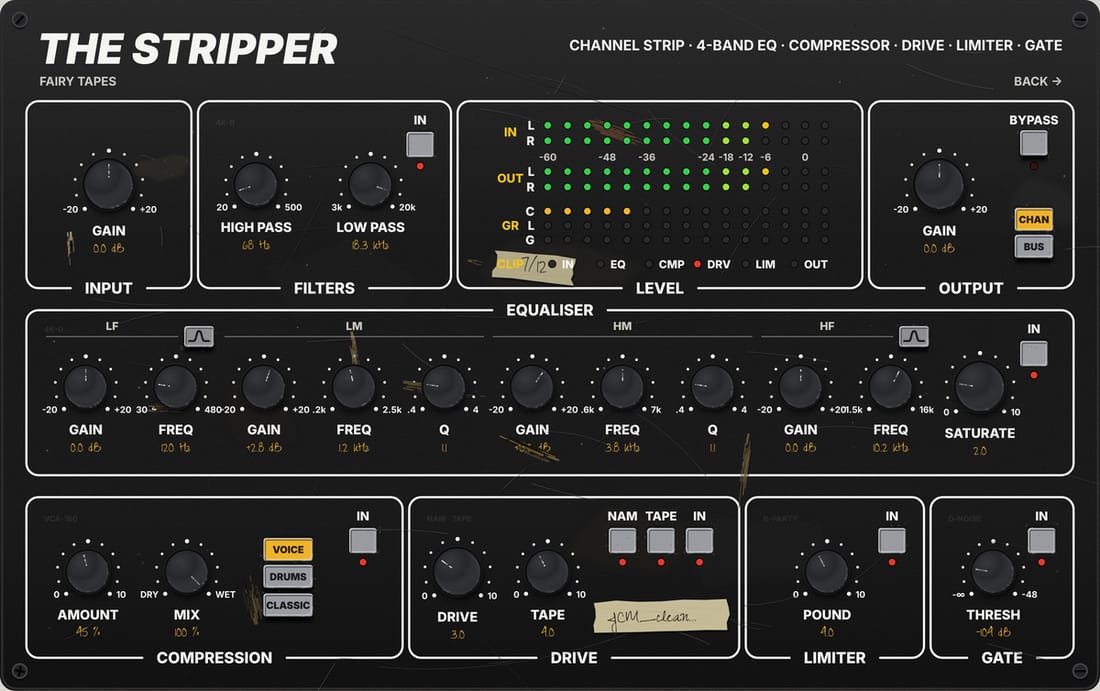
A whole console channel on one panel: filters, EQ, compressor, tape drive, limiter and gate.
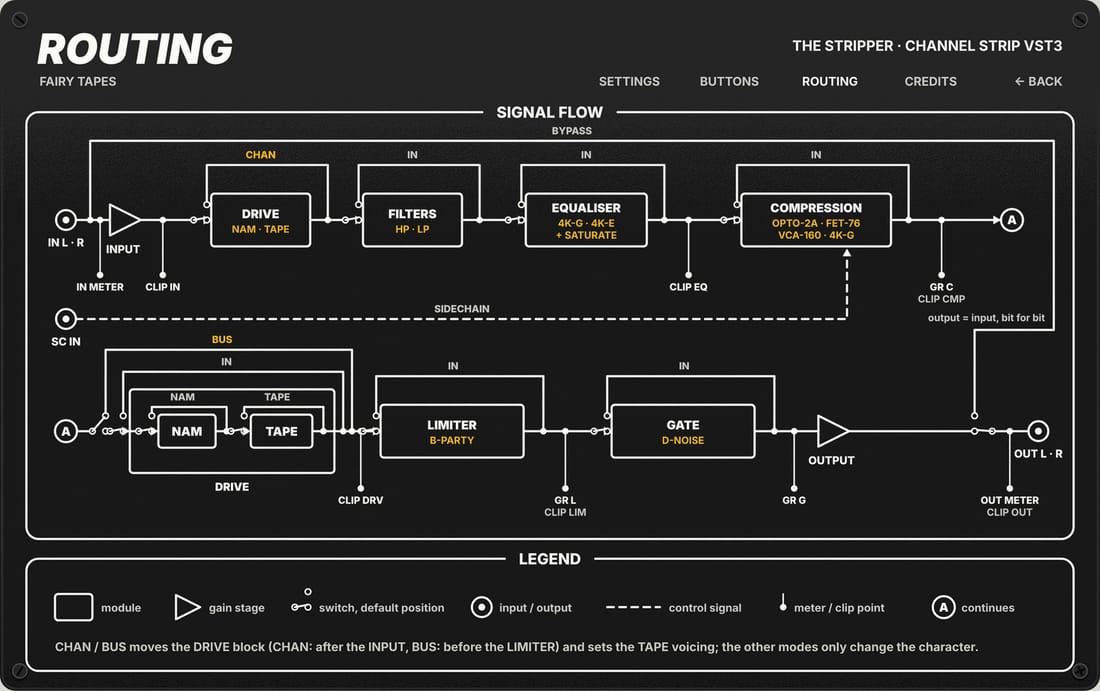
The signal runs like a console channel: filters first, then EQ, compression, drive and the limiter, with the gate in front of it all.
“An echo that waits for you: quiet while you sing, blooming in the pauses.”
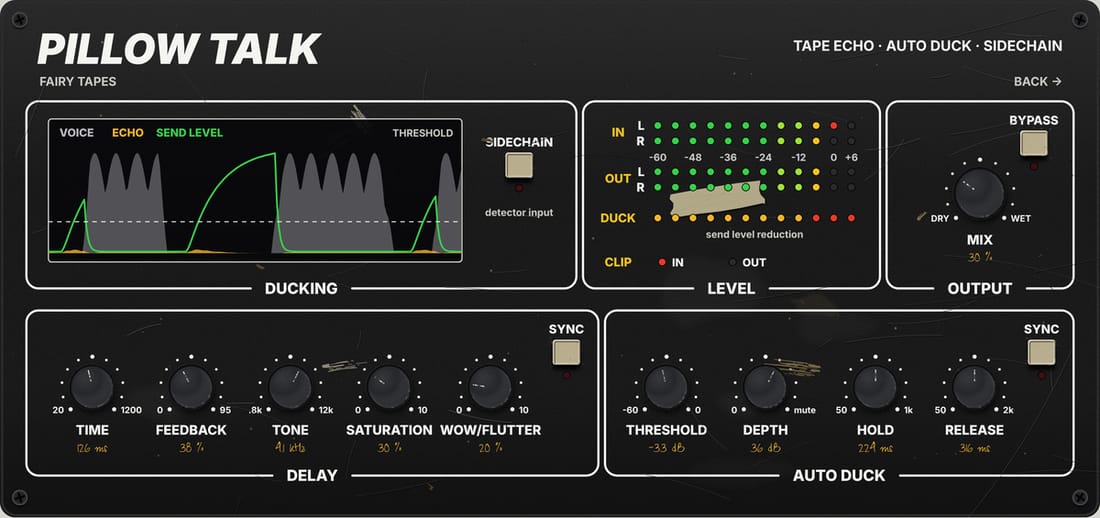
A tape echo that stays quiet while you sing and blooms in the pauses.
A tape echo that stays quiet while you sing and blooms in the pauses.
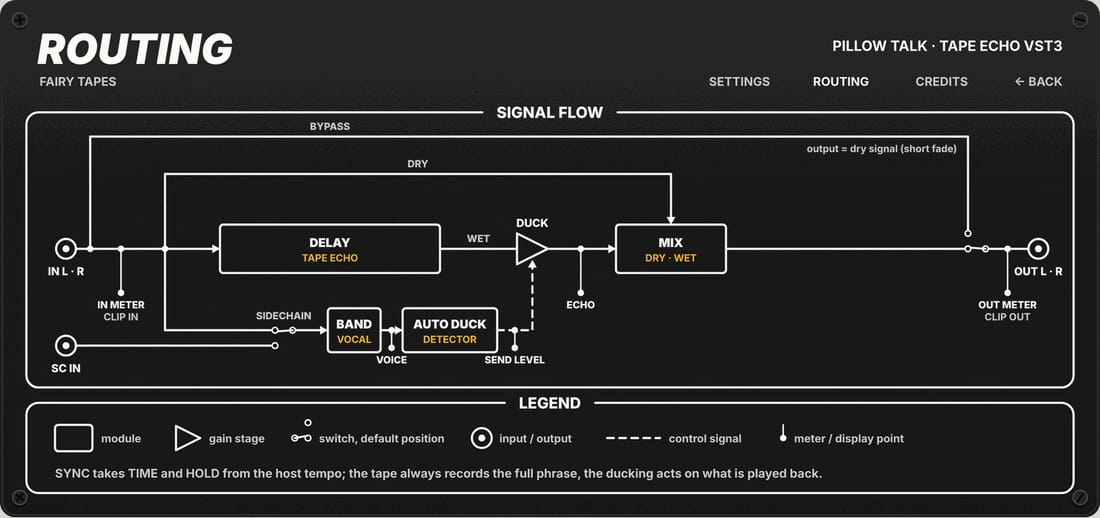
The voice goes to the tape. A detector listens to the same voice and pushes the echo down while you sing; when the phrase ends the repeats come back up.
Vocals that need space without mud. A lead guitar on a return bus. Dub throws without automation.
Time: Delay time when Time Sync is off. Moving it glides the pitch like a tape speed change; Time Sync: On: the delay time follows the host tempo and the note value chosen with Time Note; Time Note: Delay time as a note value, used when Time Sync is on; Feedback: Amount of repeats. Capped at 95 % so the echo never runs away; Tone: Low-pass inside the loop: lower values make each repeat darker; Saturation: Tape saturation inside the loop. The panel scale reads 0 to 10
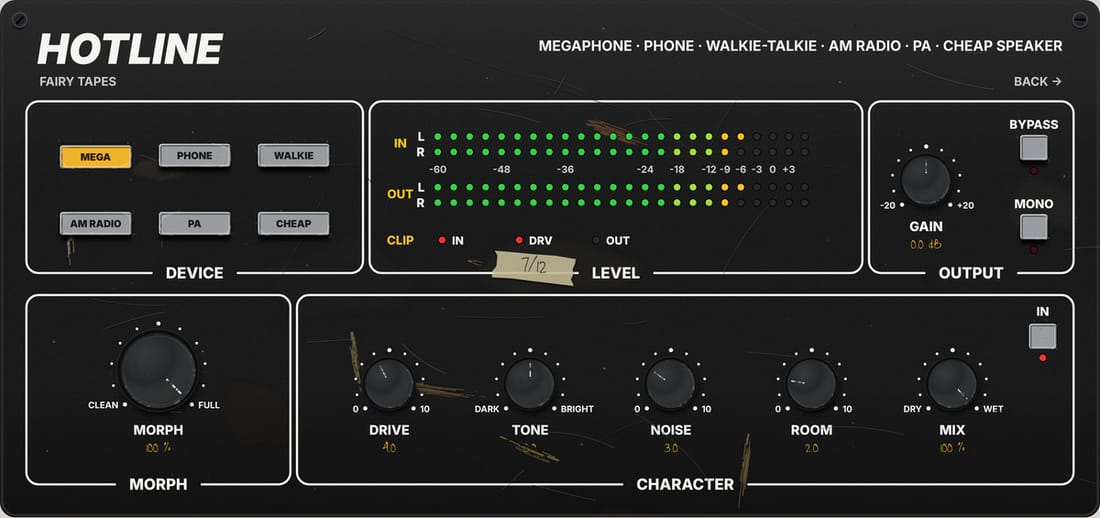
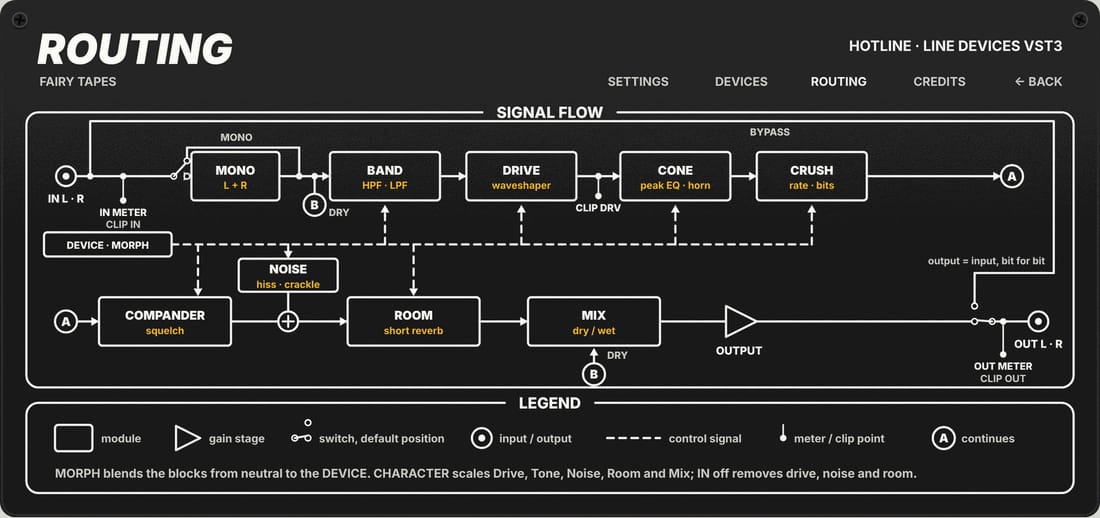
Phone, radio, megaphone: one knob from clean to broken.
Type | Voice device |
Format | VST3 |
Systems | not released yet |
Latency | 0 MS |
Licence | GPL-3.0, free |
Control · Device | Picks the device. On the panel: six buttons (MEGA, PHONE, WALKIE, AM RADIO, PA, CHEAP). A change glides over a few tens of milliseconds, without clicks. |
Control · Morph | 0 % = clean signal, exactly the input. 100 % = the full device. Safe to automate. |
Control · Drive | Scales the device's own drive: 50 % = as the device, 0 % = off, 100 % = twice. The panel scale reads 0 to 10. |
Control · Tone | Dark to bright: at +5.0 the low-pass moves up one octave and the high-pass down half an octave; at −5.0 the opposite. The shift scales with Morph. |
Control · Noise | Scales the device's noise level: 50 % = as the device, 0 % = no noise. Never louder than −20 dB. The panel scale reads 0 to 10. |
Control · Room | Scales the device's room: 50 % = as the device, 0 % = dry. Devices without a room stay dry. The panel scale reads 0 to 10. |
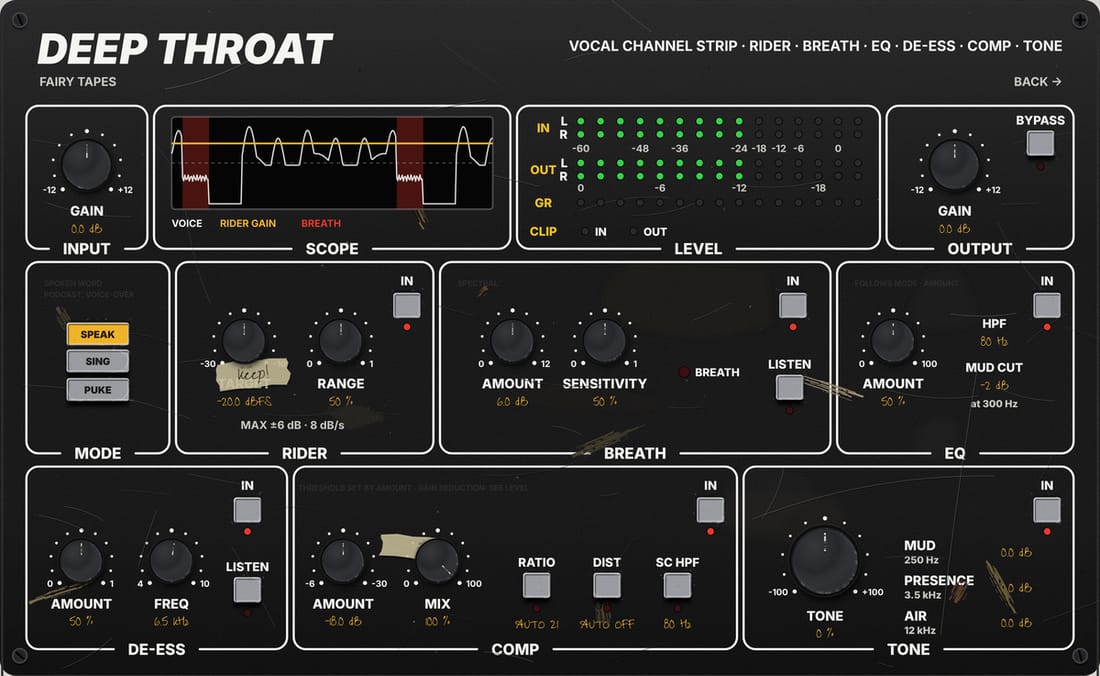
Everything a vocal needs in one chain: pick the mode, turn a few knobs, done.
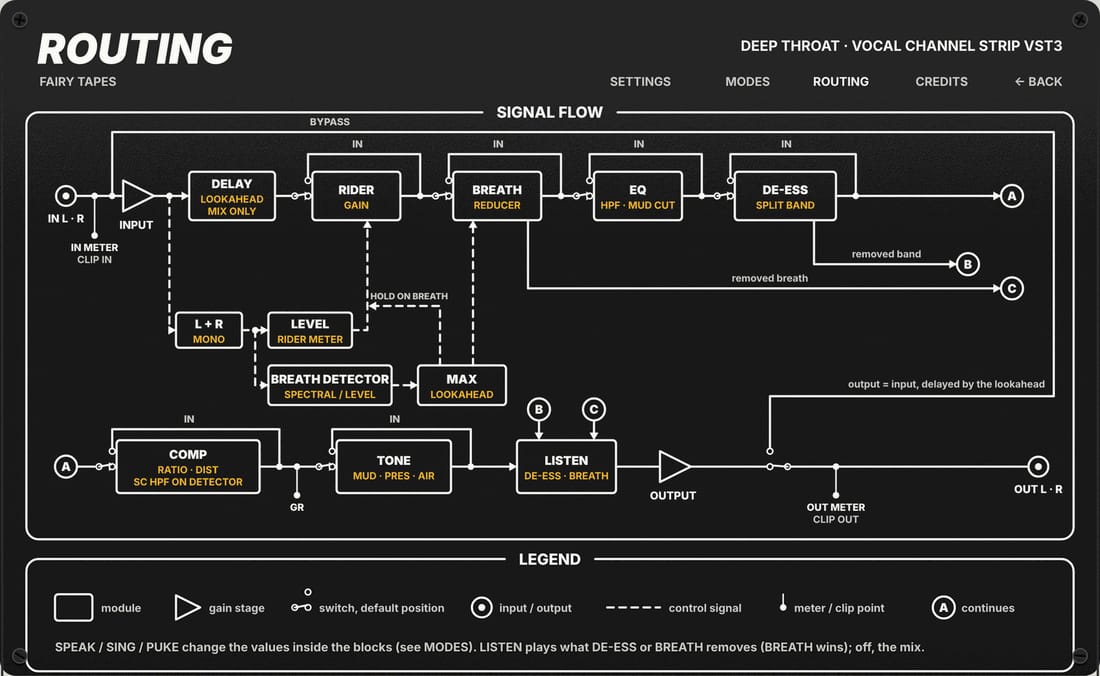
A fixed chain built for voices; the mode sets every stage at once, the knobs move what you hear most.
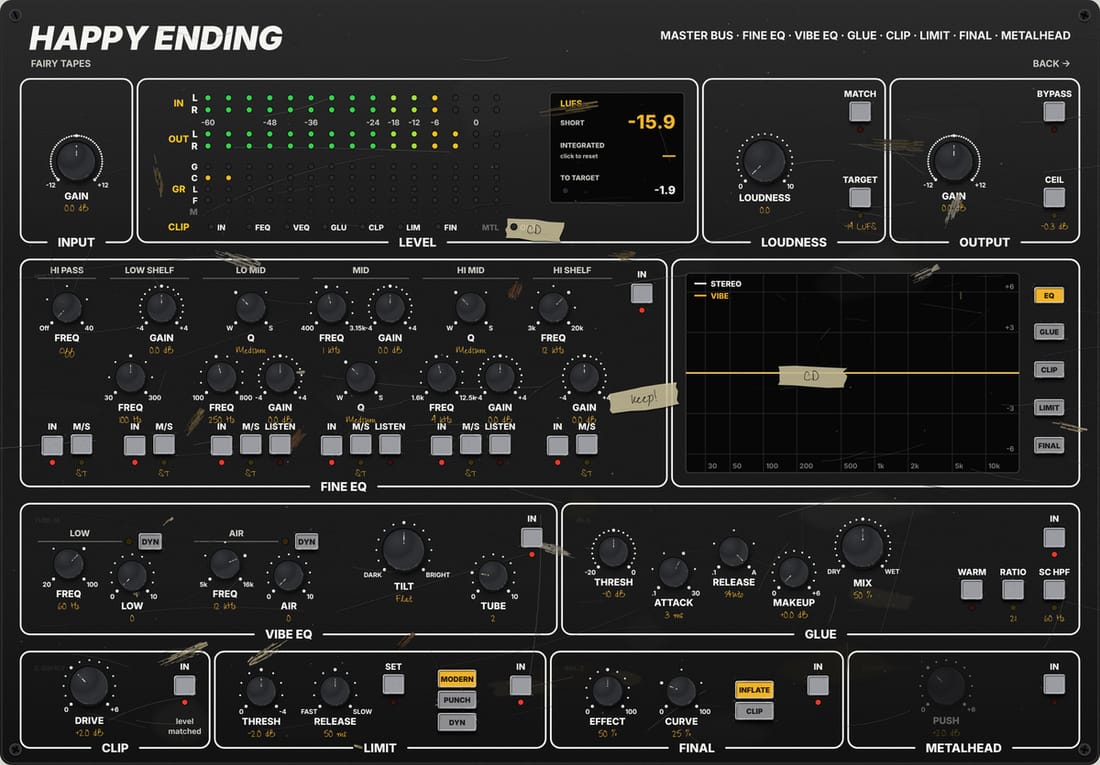
A mastering chain for the master bus, with ranges that already suit a finished song.
Use it for the final bounce, or a demo that needs to sound like a record.
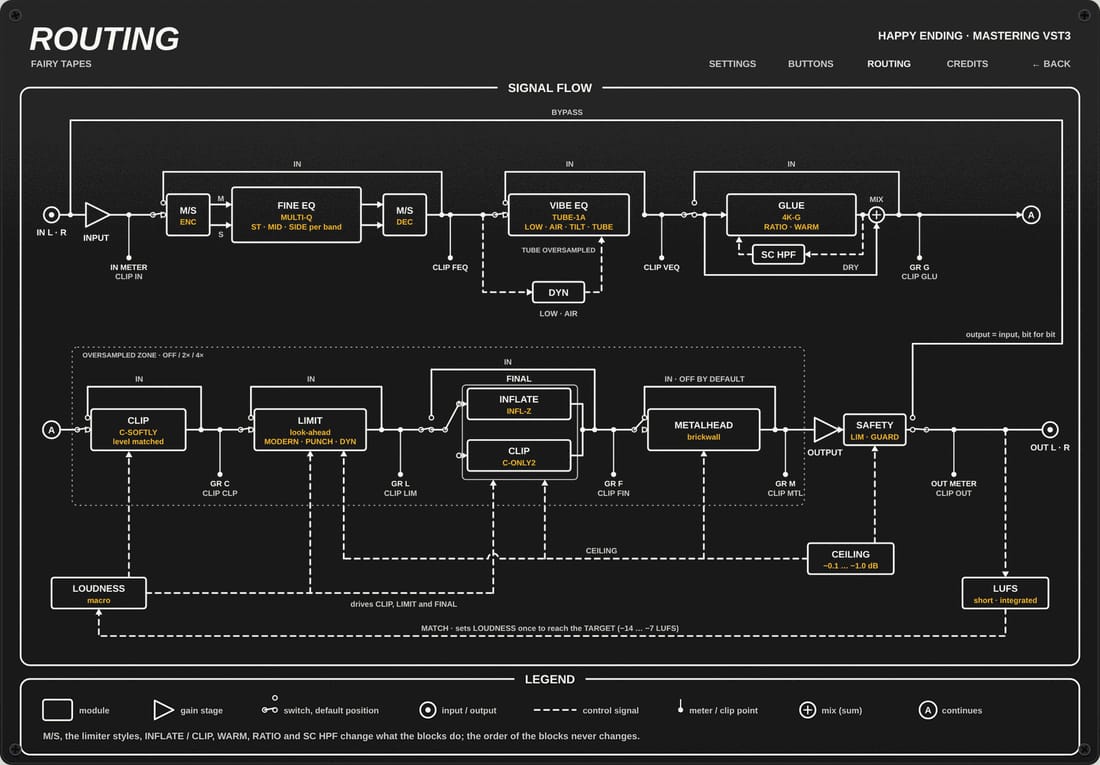
EQ, glue, colour, a gentle clip and a safe limiter, in the order a mastering engineer would use them.
Next month: Pillow Talk
C:\Program Files\Common Files\VST3/Library/Audio/Plug-Ins/VST3. Not signed by Apple yet: right-click, then Open once.~/.vst3To everyone who tried the tapes this month, sent a bug report, or told a friend: this issue exists because of you.
The Sweet Spot is written, designed and printed (well, rendered) by Sweetspot Tools.
VST 3 SDK · VSTGUI · NeuralAmpModelerCore · Airwindows · Dusk Audio · ZL Audio · libebur128 · Inter Tight · JetBrains Mono. Full list in THIRD_PARTY.md.
Tell us what you think of the tapes, or what you would like next.
WRITE TO US →